<!DOCTYPE html>
    <html lang="vi" xmlns="http://www.w3.org/1999/xhtml" prefix="og: http://ogp.me/ns#">
    <head>
<title>Hướng dẫn xóa cache trình duyệt nếu truy cập DauThau.info bị lỗi | Tin tức - DauThau.info</title>
<meta name="description" content="Hướng dẫn xóa cache trình duyệt nếu truy cập DauThau.info bị lỗi - Savefile - Tin tức - https&#x3A;&#x002F;&#x002F;dauthau.asia&#x002F;news&#x002F;savefile&#x002F;tin-tuc&#x002F;huong-dan-xoa-cache-trinh-duyet-khi-truy-cap-dauthau-info-bi-loi-331.html">
<meta name="author" content="DauThau.info - Siêu phần mềm phân tích và săn tin thầu">
<meta name="copyright" content="DauThau.info - Siêu phần mềm phân tích và săn tin thầu [info@dauthau.asia]">
<meta name="apple-mobile-web-app-capable" content="yes">
<meta name="google-site-verification" content="loKFfqZODOQrEwzLkZEoYYmRySBeMcK99oPdrc3Y_jY">
<meta name="generator" content="NukeViet v5.0">
<meta name="viewport" content="width=device-width, initial-scale=1">
<meta http-equiv="Content-Type" content="text/html; charset=utf-8">
<meta property="og:title" content="Hướng dẫn xóa cache trình duyệt nếu truy cập DauThau.info bị lỗi">
<meta property="og:type" content="website">
<meta property="og:description" content="Savefile - Tin tức - https&#x3A;&#x002F;&#x002F;dauthau.asia&#x002F;news&#x002F;savefile&#x002F;tin-tuc&#x002F;huong-dan-xoa-cache-trinh-duyet-khi-truy-cap-dauthau-info-bi-loi-331.html">
<meta property="og:site_name" content="DauThau.info - Siêu phần mềm phân tích và săn tin thầu">
<meta property="og:image" content="https://dauthau.asia/uploads/socials-image/tin-tuc-dauthau-info.png">
<meta property="og:url" content="https://dauthau.asia/news/savefile/tin-tuc/huong-dan-xoa-cache-trinh-duyet-khi-truy-cap-dauthau-info-bi-loi-331.html">
<meta property="og:locale" content="vi_VN">
<meta property="fb:app_id" content="184485808818750">
<meta property="fb:pages" content="1912758555720941">
<meta property="fb:admins" content="100001604800244">
<link rel="shortcut icon" href="https://dauthau.asia/favicon.ico">
<link rel="canonical" href="https://dauthau.asia/news/savefile/tin-tuc/huong-dan-xoa-cache-trinh-duyet-khi-truy-cap-dauthau-info-bi-loi-331.html">
<link rel="alternate" href="https://dauthau.asia/news/rss/" title="Tin tức" type="application/rss+xml">
<link rel="alternate" href="https://dauthau.asia/news/rss/tin-tuc/" title="Tin tức - Thông tin tổng hợp" type="application/rss+xml">
<link rel="alternate" href="https://dauthau.asia/news/rss/dau-thau/" title="Tin tức - Đấu thầu" type="application/rss+xml">
<link rel="alternate" href="https://dauthau.asia/news/rss/thong-tin-ho-tro/" title="Tin tức - Thông tin hỗ trợ" type="application/rss+xml">
<link rel="alternate" href="https://dauthau.asia/news/rss/hoi-dap-dau-thau/" title="Tin tức - Hỏi đáp đấu thầu" type="application/rss+xml">
<link rel="alternate" href="https://dauthau.asia/news/rss/tu-lieu-cho-nha-thau/" title="Tin tức - Tư liệu cho nhà thầu" type="application/rss+xml">
<link rel="alternate" href="https://dauthau.asia/news/rss/phan-tich-nhan-dinh/" title="Tin tức - Phân tích - nhận định" type="application/rss+xml">
<link rel="alternate" href="https://dauthau.asia/news/rss/dau-gia/" title="Tin tức - Đấu giá" type="application/rss+xml">
<link rel="alternate" href="https://dauthau.asia/news/rss/blog/" title="Tin tức - Blog" type="application/rss+xml">
<link rel="alternate" href="https://dauthau.asia/news/rss/ctv/" title="Tin tức - Cộng Tác Viên" type="application/rss+xml">
<link rel="search" type="application/opensearchdescription+xml" href="https://dauthau.asia/seek/opensearch/" title="DauThau.info">
<link rel="search" type="application/opensearchdescription+xml" href="https://dauthau.asia/seek/opensearch/bidding/" title="Đấu thầu">
<link rel="search" type="application/opensearchdescription+xml" href="https://dauthau.asia/seek/opensearch/news/" title="Tin tức">
<link rel="search" type="application/opensearchdescription+xml" href="https://dauthau.asia/seek/opensearch/businesslistings/" title="Nhà thầu">
<link rel="manifest" href="https://dauthau.asia/manifest.webmanifest">
<link rel="apple-touch-icon" href="https://dauthau.asia/uploads/icon_192.png">
<link rel="apple-touch-icon" sizes="152x152" href="https://dauthau.asia/uploads/icon_152.png">
<link rel="apple-touch-icon" sizes="180x180" href="https://dauthau.asia/uploads/icon_180.png">
<link rel="apple-touch-icon" sizes="167x167" href="https://dauthau.asia/uploads/icon_167.png">
<link rel="stylesheet" href="/assets/css/core.r.min.css?t=1780977016">
<link rel="stylesheet" href="https://dauthau.asia/themes/dauthau/css/dauthau.responsive.css">
<link rel="stylesheet" href="https://dauthau.asia/themes/dauthau/plugins/daterangepicker/daterangepicker-luna.css">
<link rel="stylesheet" href="https://dauthau.asia/themes/dauthau/css/dataTables.bootstrap.min.css">
<link rel="stylesheet" href="https://dauthau.asia/themes/dauthau/css/news.css">
<link rel="stylesheet" href="https://dauthau.asia/assets/js/show-pass-btn/bootstrap3-show-pass.css">
<link rel="stylesheet" href="https://dauthau.asia/assets/js/perfect-scrollbar/style.css">
<style type="text/css">
    body{background: #fff;}
</style>
        <!-- place this in a head section -->
<!-- Google Tag Manager --><script data-show="inline">(function(w,d,s,l,i){w[l]=w[l]||[];w[l].push({'gtm.start': new Date().getTime(),event:'gtm.js'});var f=d.getElementsByTagName(s)[0],j=d.createElement(s),dl=l!='dataLayer'?'&l='+l:'';j.async=true;j.src='https://www.googletagmanager.com/gtm.js?id='+i+dl;f.parentNode.insertBefore(j,f);})(window,document,'script','dataLayer','GTM-KQM2QDV');</script><!-- End Google Tag Manager --> <!-- Global site tag (gtag.js) - Google Ads: 667923239 --><script async src="https://www.googletagmanager.com/gtag/js?id=AW-667923239"></script><script data-show="inline">window.dataLayer = window.dataLayer || [];function gtag() {    dataLayer.push(arguments);}gtag('js', new Date());gtag('config', 'AW-667923239');</script><!-- Event snippet for Tiếp thị lại khách chưa có tài khoản remarketing page --><script> gtag('event', 'conversion', {   'send_to': 'AW-667923239/0abFCMSM7soBEKfmvr4C',   'value': 1.0,   'currency': 'VND',    'aw_remarketing_only': true });   </script><!-- Event snippet for Người dùng chưa có tài khoản 90 ngày remarketing page --><script>gtag('event', 'conversion', {    'send_to': 'AW-667923239/RQfOCIOS9P8BEKfmvr4C',    'value': 1.0,    'currency': 'VND',    'aw_remarketing_only': true});   </script> </head>
    <body class="op-savefile mf-news mn-news langi-vi"><!-- Google Tag Manager (noscript) --><noscript><iframe src="https://www.googletagmanager.com/ns.html?id=GTM-KQM2QDV" height="0" width="0" style="display:none;visibility:hidden"></iframe></noscript><!-- End Google Tag Manager (noscript) -->
<div id="print">
    <div id="hd_print">
        <h2 class="pull-left">DauThau.info - Siêu phần mềm phân tích và săn tin thầu</h2>
        <p class="pull-right"><a title="DauThau.info - Siêu phần mềm phân tích và săn tin thầu" href="https://dauthau.asia/">https://dauthau.asia</a></p>
    </div>
    <div class="clear"></div>
    <hr />
    <div id="content">
        <h1>Hướng dẫn xóa cache trình duyệt nếu truy cập DauThau.info bị lỗi</h1>
        <ul class="list-inline">
            <li>Thứ năm, 04 Tháng Ba 2021 8:00 SA</li>
            <li class="hidden-print txtrequired"><em class="fa fa-print">&nbsp;</em><a title="In ra" href="https://dauthau.asia/#" data-toggle="winCMD" data-cmd="print">In ra</a></li>
            <li class="hidden-print txtrequired"><em class="fa fa-power-off">&nbsp;</em><a title="Đóng cửa sổ này" href="https://dauthau.asia/#"  data-toggle="winCMD" data-cmd="close">Đóng cửa sổ này</a></li>
        </ul>
        <div class="clear"></div>
        <div id="hometext">
            DauThau.info thường xuyên nâng cấp và cải tiến để phục vụ nhà thầu, trong quá trình này sẽ không tránh khỏi những lỗi nhỏ. Một số nhà thầu có thể sẽ gặp trường hợp truy cập bị lỗi, bị trắng trang, không vào được ngay cả khi DauThau.info đã sửa lỗi xong. Dưới đây là một số nguyên nhân và cách giải quyết mà quý khách hàng có thể theo dõi và thực hiện.
        </div>
                <div class="imghome">
            <img alt="Hướng dẫn xóa cache trình duyệt nếu truy cập DauThau.info bị lỗi" src="https://dauthau.asia/uploads/news/sharepic/vip3-dauthau.jpg" width="800" class="img-thumbnail" />
        </div>
        <div class="clear"></div>
        <div id="bodytext" class="clearfix">
            <p><em><strong><a href="https://dauthau.asia/en/news/support-information/instructions-to-clear-browser-cache-if-you-have-a-problem-while-accessing-dauthau-info-38.html" target="_blank">CLICK HERE</a></strong>&nbsp;to view in English&nbsp;</em></p>
<h1>I. Lỗi do chưa xóa Cache Website</h1>
<h2>Cache Website là gì? Tại sao chúng ta lại phải xóa Cache?</h2>
<div style="text-align:justify">Cache hay bộ nhớ đệm là phần cứng hoặc phần mềm được tích hợp sẵn với tác dụng lưu trữ dữ liệu tạm thời trong môi trường máy tính. Trong quá trình website mới hoạt động và có sự chỉnh sửa thường xuyên từ kỹ thuật, đôi lúc người dùng sẽ tạm thời không truy cập được vào website, vì vậy bạn hãy xóa cache trình duyệt mới thấy được các chỉnh sửa mới nhất.&nbsp;</div>
<h2 style="text-align:justify">Cách xóa Cache trên mọi loại trình duyệt</h2>
<h3 style="text-align:justify">1. Trên Máy tính</h3>
<p style="text-align:justify"><strong>1.1. Trình duyệt Chrome (Window)</strong><br />
<u><strong>Bước 1:</strong></u> Trên máy tính của bạn, hãy mở Chrome.<br />
<u><strong>Bước 2:</strong></u> Trên thanh công cụ trình duyệt của bạn, nhấp vào dấu <img alt="Mi22012" height="24" src="https://dauthau.asia/uploads/news/2021_02/mi22012.png" width="24" />&nbsp;trên góc phải màn hình → Chọn Công cụ khác sau đó Xóa dữ liệu duyệt web.<br />
<u><strong>Bước 3:</strong></u> Trong hộp &quot;Xóa dữ liệu duyệt web&quot;, nhấp vào hộp kiểm cho Cookie và dữ liệu trang web khác và Hình ảnh và tệp trong bộ nhớ cache.<br />
&nbsp;</p>
<div class="image-center"><img alt="xoa cache window" height="494" src="https://dauthau.asia/uploads/news/2021_02/xoa-cache-window.png" width="528" /></div>
<p style="text-align:justify"><br />
<u><strong>Bước 4:</strong></u> Sử dụng menu ở trên cùng để chọn lượng dữ liệu bạn muốn xóa. Chọn mọi thứ để xóa mọi thứ.<br />
<u><strong>Bước 5:</strong></u> Nhấp vào Xóa dữ liệu duyệt web<br />
<br />
<strong>1.2. Trình duyệt Chrome (Mac)<br />
<u>Bước 1:</u></strong> Click on Chrome &gt; Clear Browsing Data....<br />
<u><strong>Bước 2:</strong></u> Kiểm tra các thông tin sau:</p>
<ul>
	<li style="text-align: justify;">Cookies and other site data</li>
	<li style="text-align: justify;">Cached images and files</li>
</ul>
<p style="text-align:justify">Chọn khung thời gian cần xóa (Đối với phiên bản Chrome 59) hoặc đối với phiên bản Chrome 58 hoặc cũ hơn thì kiểm tra:</p>
<ul>
	<li style="text-align: justify;">Empty the cache</li>
	<li style="text-align: justify;">Delete cookies and other site data</li>
</ul>
<p style="text-align:justify"><u><strong>Bước 3:</strong></u> Chọn Clear Browsing Data<br />
<br />
<strong>1.3. Trình duyệt CocCoc(Window)</strong><br />
<u><strong>Bước 1:</strong></u> Ấn đồng thời tổ hợp phím Ctrl + Shift + Delete<br />
<u><strong>Bước 2:</strong></u> Chọn Mọi thứ<br />
<u><strong>Bước 3:</strong></u> Nhấn chọn vào các ô cần xóa Cookie cùng dữ liệu plugin và trang web khác, lịch sử duyệt web, lịch sử tải xuống, tệp và hình ảnh được lưu trong bộ nhớ cache, mật khẩu<br />
<u><strong>Bước 4:</strong></u> Nhấp vào Xóa dữ liệu duyệt web<br />
<br />
<strong>1.4. Trình duyệt Internet Explorer 9<br />
<u>Cách 1:</u></strong> Trên trình duyệt, bấm tổ hợp phím Ctrl + R<br />
<u><strong>Cách 2:</strong></u></p>
<ul>
	<li style="text-align: justify;">Bước 1: Bấm tổ hợp phím Ctrl + Shift + Del</li>
	<li style="text-align: justify;">Bước 2: Bỏ chọn mục Preserve favorites website data</li>
</ul>
<div style="text-align:justify">Ngoài ra,&nbsp;bạn cũng có thể đánh dấu vào mục Delete browsing history on exit để trình duyệt tự xóa cache, cookies... khi tắt trình duyệt:</div>
<ul>
	<li style="text-align: justify;">Bước 3: Vào menu Tools, chọn Internet options</li>
	<li style="text-align: justify;">Bước 4: Chọn Delete browsing history on exit. Sau đó chọn OK</li>
</ul>
<h4 style="text-align:justify"><strong>1.5. Trình duyệt Firefox</strong><br />
<u><strong>Bước 1:</strong></u> Khi mở Mozilla Firefox mở ký hiệu menu 3 gạch bên góc phải màn hình, chọn Library › History › Clear Recent History<br />
<u><strong>Bước 2:</strong></u> Chọn thời gian cần xóa. Để xóa toàn bộ, chọn tùy chọn All Time<br />
<u><strong>Bước 3:</strong></u> Chọn element nào để xóa – cache, cookies, history.<br />
<u><strong>Bước 4:</strong></u> Nhấn nút Clear Now.<br />
&nbsp;</h4>
<h3 style="text-align:justify">2. Trên Điện thoại</h3>
<p style="text-align:justify"><strong>2.1. Hệ điều hành Android</strong><br />
<u><strong>Bước 1:</strong></u> Trên điện thoại hoặc máy tính bảng Android của bạn, hãy mở Chrome.<br />
<u><strong>Bước 2:</strong></u> Trên thanh công cụ trình duyệt của bạn, nhấn vào dấu ba chấm dọc bên góc phải màn hình.<br />
<u><strong>Bước 3:</strong></u> Nhấn vào Lịch sử, sau đó nhấn vào Xóa dữ liệu duyệt web.</p>
<div class="image-center"><img alt="xoa cache android1" height="995" src="https://dauthau.asia/uploads/news/2021_02/xoa-cache-android1.jpg" width="472" /></div>
<p style="text-align:justify"><br />
<u><strong>Bước 4:</strong></u> Trong &quot;Xóa dữ liệu duyệt web&quot;, chọn hộp kiểm cho Cookie và dữ liệu trang web và Hình ảnh và tệp trong bộ nhớ cache.<br />
&nbsp;</p>
<div class="image-center"><img alt="xoa cache android2" height="781" src="https://dauthau.asia/uploads/news/2021_02/xoa-cache-android2.jpg" width="370" /></div>
<p style="text-align:justify"><br />
<u><strong>Bước 5:</strong></u> Sử dụng menu ở trên cùng để chọn lượng dữ liệu bạn muốn xóa. Chọn mọi thứ để xóa mọi thứ.<br />
<u><strong>Bước 6:</strong></u> Nhấp vào Xóa dữ liệu duyệt web.<br />
<br />
<strong>2.2. Hệ điều hành IOS (gồm Ipad &amp; Iphone)</strong></p>
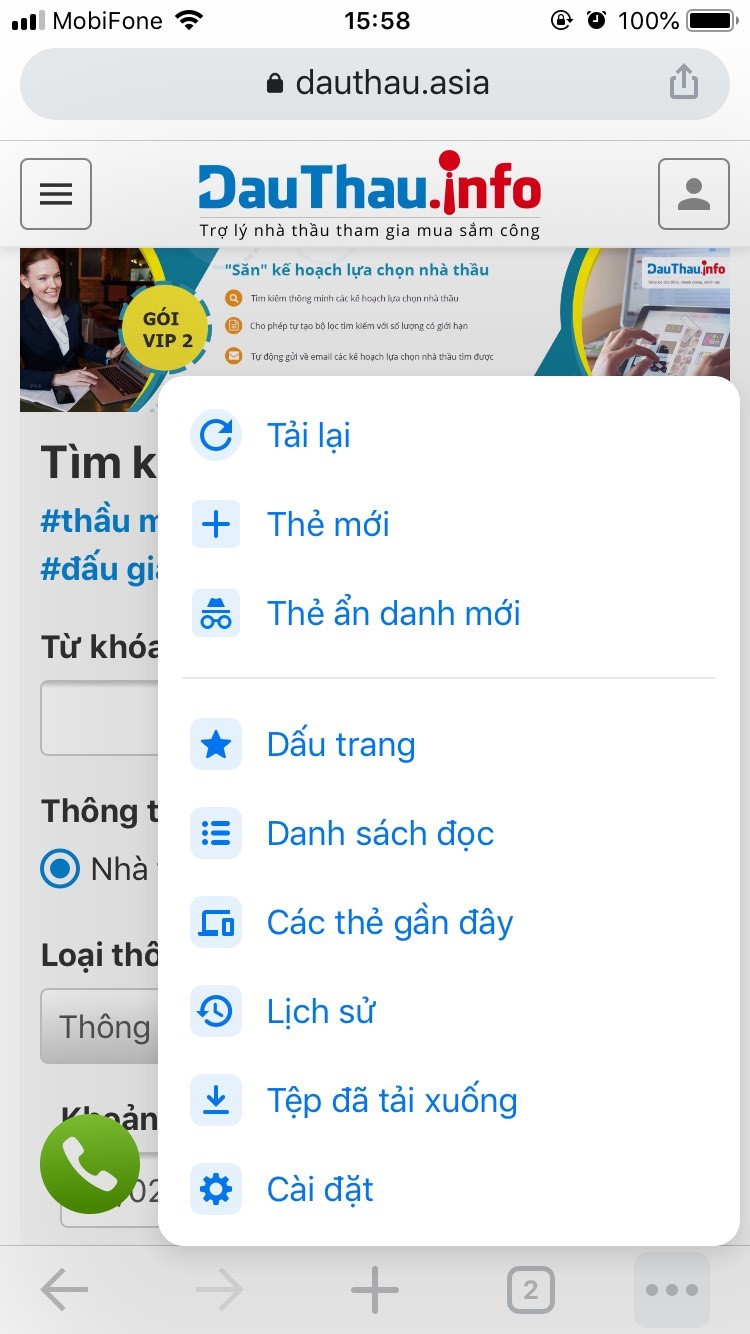
<p style="text-align:justify"><u><strong>Bước 1:</strong></u> Trên iPhone hoặc iPad của bạn, hãy mở Chrome.<br />
<u><strong>Bước 2:</strong></u> Trên thanh công cụ trình duyệt của bạn, nhấn vào dấu Thêm</p>
<div class="image-center"><img alt="xoa cache ios1" height="615" src="https://dauthau.asia/uploads/news/2021_02/xoa-cache-ios1.jpg" width="346" /></div>
<p style="text-align:justify"><br />
<u><strong>Bước 3:</strong></u> Nhấn vào Lịch sử, sau đó nhấn vào Xóa dữ liệu duyệt web.<br />
<u><strong>Bước 4:</strong></u> Trong &quot;Xóa dữ liệu duyệt web&quot;, chọn hộp kiểm cho Cookie và dữ liệu trang web và Hình ảnh và tệp trong bộ nhớ cache.<br />
<u><strong>Bước 5:</strong></u> Sử dụng menu ở trên cùng để chọn lượng dữ liệu bạn muốn xóa. Chọn mọi thứ để xóa mọi thứ.<br />
<u><strong>Bước 6:</strong></u> Nhấp vào Xóa dữ liệu duyệt web.</p>
<div class="image-center"><img alt="xoa cache ios2" height="660" src="https://dauthau.asia/uploads/news/2021_02/xoa-cache-ios2.jpg" width="371" /></div>
<h1 style="text-align:justify"><br />
II. Lỗi do chưa xóa DNS Website</h1>
&nbsp;
<div style="text-align:justify">Bộ nhớ cache DNS (Domain Name Server)&nbsp;&nbsp;là một file trên máy tính của bạn, có chứa danh sách địa chỉ IP của các trang web được bạn sử dụng thường xuyên.<br />
Thông tin DNS có thể không được cập nhật một cách nhanh chóng trên máy tính của bạn, và bạn có thể sẽ ghé thăm trang web cũ hoặc gặp phải lỗi không tìm thấy. Do vậy chúng ta cần thực hiện xóa DNS để có thể có những cập nhật mới nhất.&nbsp;<br />
&nbsp;</div>
<h2 style="text-align:justify">Xóa Cache DNS trong Windows</h2>
<u><strong>Bước 1:</strong></u> Bấm vào nút khởi động và chọn tìm (command prompt) công cụ CMD.<br />
<u><strong>Bước 2</strong>:</u> Gõ dòng lệnh:&nbsp;<strong><em>ipconfig /flushdns</em></strong><br />
&nbsp;
<div style="text-align:center">
<div class="image-center"><img alt="xoa DNS window" height="231" src="https://dauthau.asia/uploads/news/2021_03/xoa-dns-window.png" width="829" /></div>
</div>
<br />
Vậy là chúng ta đã hoàn thành xong<br />
&nbsp;
<h2>Xóa DNS Cache trên MacOS</h2>
<div style="text-align:justify"><strong><u>Bước 1:</u></strong> Khởi động ứng dụng Terminal (có thể tìm thấy trong Launchpad trong thư mục ‘Other’). Hoặc khởi động nó bằng cách mở Finder và đi đến &nbsp;Applications » Utilities.<br />
<strong><u>Bước 2:</u></strong> Cửa sổ terminal&nbsp; được mở ra, bạn thực hiện nhập vào lệnh sau đây: <strong><em>sudo killall -HUP mDNSResponder</em></strong><br />
Lưu ý: Bạn sẽ được yêu cầu nhập mật khẩu tài khoản MacOS của bạn. Đây là mật khẩu mà bạn dùng để đăng nhập vào máy tính.<br />
Ngay sau đó, máy tính của bạn sẽ xóa bộ nhớ cache DNS.<br />
<br />
&nbsp;</div>
<h2>Xóa DNS Cache trong Chrome</h2>
<u><strong>Bước 1: </strong></u>Truy cập vào Chrome, nhập địa chỉ sau và nhấn Enter:<strong><em> chrome://net-internals/#dns</em><br />
<u>Bước 2:</u></strong> Nhấn vào nút ‘Clear host cache’, và Chrome sẽ xóa toàn bộ cache DNS ngay lập tức.<br />
&nbsp;
<div style="text-align:center">
<div class="image-center"><img alt="xoa DNS chrome" height="234" src="https://dauthau.asia/uploads/news/2021_03/xoa-dns-chrome.png" width="772" /></div>
</div>
<p style="text-align:justify"><br />
Trên đây là một sô cách xóa cache website DauThau.info khi truy cập&nbsp;bị lỗi. Chúng tôi rất mong nhận được những phản hồi của quý khách hàng để hoàn thiện các phiên bản ngày một tốt hơn. Xin trân trọng cảm ơn!</p>
        </div>
                <div id="author">
                        <p>
                <strong>Tác giả:</strong>
                <a href="https://dauthau.asia/news/author/dang-huong-lan/">Đặng Hương Lan</a>
            </p>
        </div>
    </div>
    <div id="footer" class="clearfix">
        <div id="url">
            <strong>URL của bản tin này: </strong><a href="https://dauthau.asia/news/savefile/tin-tuc/huong-dan-xoa-cache-trinh-duyet-khi-truy-cap-dauthau-info-bi-loi-331.html" title="Hướng dẫn xóa cache trình duyệt nếu truy cập DauThau.info bị lỗi">https://dauthau.asia/news/savefile/tin-tuc/huong-dan-xoa-cache-trinh-duyet-khi-truy-cap-dauthau-info-bi-loi-331.html</a>
        </div>
        <div class="clear"></div>
        <div class="copyright">
            &copy; DauThau.info - Siêu phần mềm phân tích và săn tin thầu
        </div>
        <div id="contact">
            <a href="mailto:info@dauthau.asia">info@dauthau.asia</a>
        </div>
    </div>
</div>
        <div class="pswp" tabindex="-1" role="dialog" aria-hidden="true">
            <div class="pswp__bg"></div>
            <div class="pswp__scroll-wrap">
                <div class="pswp__container">
                    <div class="pswp__item"></div>
                    <div class="pswp__item"></div>
                    <div class="pswp__item"></div>
                </div>
                <div class="pswp__ui pswp__ui--hidden">
                    <div class="pswp__top-bar">
                        <div class="pswp__counter"></div>
                        <button class="pswp__button pswp__button--close" title="Đóng (Esc)"></button>
                        <button class="pswp__button pswp__button--fs" title="Toàn màn hình"></button>
                        <button class="pswp__button pswp__button--zoom" title="Kích thước thực"></button>
                        <div class="pswp__preloader">
                            <div class="pswp__preloader__icn">
                              <div class="pswp__preloader__cut">
                                <div class="pswp__preloader__donut"></div>
                              </div>
                            </div>
                        </div>
                    </div>
                    <div class="pswp__share-modal pswp__share-modal--hidden pswp__single-tap">
                        <div class="pswp__share-tooltip"></div>
                    </div>
                    <button class="pswp__button pswp__button--arrow--left" title="Trước (phím trái)">
                    </button>
                    <button class="pswp__button pswp__button--arrow--right" title="Sau (Phím phải)">
                    </button>
                    <div class="pswp__caption">
                        <div class="pswp__caption__center"></div>
                    </div>
                </div>
            </div>
        </div>
        <div id="timeoutsess" class="chromeframe">
            Bạn đã không sử dụng site, <a onclick="timeoutsesscancel();" href="https://dauthau.asia/#">Bấm vào đây để duy trì trạng thái đăng nhập</a>. Thời gian chờ: <span id="secField"> 60 </span> giây
        </div>
        <div id="openidResult" data-sso-domain="https://iportal.vn" class="nv-alert" style="display:none"></div>
        <div id="openidBt" data-result="" data-redirect=""></div>
        <div id="fb-root"></div>
<script src="https://dauthau.asia/assets/js/jquery/jquery.min.js"></script>
<script>var nv_base_siteurl="/",nv_assets_dir="assets",nv_lang_data="vi",nv_lang_interface="vi",nv_name_variable="nv",nv_fc_variable="op",nv_lang_variable="language",nv_module_name="news",nv_func_name="savefile",nv_is_user=0, nv_my_ofs=7,nv_my_abbr="+07",nv_cookie_prefix="nv4c_asia",nv_check_pass_mstime=29938000,nv_area_admin=0,nv_safemode=0,theme_responsive=1,nv_recaptcha_ver=2,nv_recaptcha_sitekey="6Lc5g1AUAAAAAAfvGBOy9_670MiVcRKh1IXrIWOQ",nv_recaptcha_type="image",nv_turnstile_sitekey="",XSSsanitize=0,nv_jsdate_get="dd-mm-yyyy",nv_jsdate_post="dd/mm/yyyy",nv_js_am="SA",nv_js_pm="CH",nv_gfx_width="150",nv_gfx_height="40",nv_gfx_num="6",nv_cache_timestamp=1780977016;</script>
<script src="https://dauthau.asia/assets/js/language/vi.js"></script>
<script src="https://dauthau.asia/assets/js/global.js"></script>
<script src="https://dauthau.asia/assets/js/site.js"></script>
<script src="https://dauthau.asia/assets/js/moment/moment.min.js"></script>
<script src="https://dauthau.asia/themes/dauthau/js/news.js"></script>
<script src="https://dauthau.asia/assets/js/perfect-scrollbar/min.js"></script>
<script src="https://dauthau.asia/themes/dauthau/plugins/daterangepicker/daterangepicker-luna.js"></script>
<script src="https://dauthau.asia/themes/dauthau/js/photoswipe.js"></script>
<script src="https://dauthau.asia/themes/dauthau/js/photoswipe-ui-default.js"></script>
<script src="https://dauthau.asia/themes/dauthau/js/main.js"></script>
<script src="https://dauthau.asia/themes/dauthau/js/jquery.dataTables.min.js"></script>
<script src="https://dauthau.asia/assets/js/show-pass-btn/bootstrap3-show-pass.js"></script>
<script>var url_load_remote = 'https://api.dauthau.asia/mload.php?timestamp=1781081518&userhash=2dc3415578e3367af0bfaca7ec410236', domain_load_remote = 'https://api.dauthau.asia/', url_sload_remote = 'https://api.dauthau.asia/sload.php?timestamp=1781081518&userhash=2dc3415578e3367af0bfaca7ec410236';</script>
<script type="application/ld+json">
{"@context":"https://schema.org","@type":"WebSite","name":"DauThau.info - Siêu phần mềm phân tích và săn tin thầu","url":"https://dauthau.asia/","potentialAction":{"@type":"SearchAction","target":{"@type":"EntryPoint","urlTemplate":"https://dauthau.asia/seek/?q={search_term_string}"},"query-input":"required name=search_term_string"}}
</script>
<script type="application/ld+json">
            {"@context":"https://schema.org","@graph":[{"@context":"https://schema.org","@type":"SiteNavigationElement","id":"site-navigation","name":"Giới thiệu","url":"https://dauthau.asia/about/gioi-thieu-ve-dauthau-info.html"},{"@context":"https://schema.org","@type":"SiteNavigationElement","id":"site-navigation","name":"Bảng giá","url":"https://dauthau.asia/page/bang-gia.html"},{"@context":"https://schema.org","@type":"SiteNavigationElement","id":"site-navigation","name":"Tin tức","url":"https://dauthau.asia/news/"},{"@context":"https://schema.org","@type":"SiteNavigationElement","id":"site-navigation","name":"Đấu thầu","url":"https://dauthau.asia/detail/"},{"@context":"https://schema.org","@type":"SiteNavigationElement","id":"site-navigation","name":"Hướng dẫn","url":"https://dauthau.asia/page/huong-dan-su-dung.html"},{"@context":"https://schema.org","@type":"SiteNavigationElement","id":"site-navigation","name":"Liên hệ","url":"https://dauthau.asia/contact/"}]}
        </script>
<script src="https://dauthau.asia/themes/dauthau/js/bootstrap.min.js"></script>
</body>
</html>