<!DOCTYPE html>
    <html lang="vi" xmlns="http://www.w3.org/1999/xhtml" prefix="og: http://ogp.me/ns#">
    <head>
<title>Giải đáp thắc mắc khi đăng nhập qua Google Authenticator trên Hệ thống mạng đấu thầu quốc gia mới - Phần 1 | Tin tức - DauThau.info</title>
<meta name="description" content="Giải đáp thắc mắc khi đăng nhập qua Google Authenticator trên Hệ thống mạng đấu thầu quốc gia mới - Phần 1 - Savefile - Tin tức - https&#x3A;&#x002F;&#x002F;dauthau.asia&#x002F;news&#x002F;savefile&#x002F;hoi-dap-dau-thau&#x002F;giai-dap-thac-mac-khi-dang-nhap-qua-google-authenticator-tren-he-thong-mang-dau-thau-quoc-gia-moi-918.html">
<meta name="author" content="DauThau.info - Siêu phần mềm phân tích và săn tin thầu">
<meta name="copyright" content="DauThau.info - Siêu phần mềm phân tích và săn tin thầu [info@dauthau.asia]">
<meta name="apple-mobile-web-app-capable" content="yes">
<meta name="google-site-verification" content="loKFfqZODOQrEwzLkZEoYYmRySBeMcK99oPdrc3Y_jY">
<meta name="generator" content="NukeViet v5.0">
<meta name="viewport" content="width=device-width, initial-scale=1">
<meta http-equiv="Content-Type" content="text/html; charset=utf-8">
<meta property="og:title" content="Giải đáp thắc mắc khi đăng nhập qua Google Authenticator trên Hệ thống mạng đấu thầu quốc gia mới - Phần 1">
<meta property="og:type" content="website">
<meta property="og:description" content="Savefile - Tin tức - https&#x3A;&#x002F;&#x002F;dauthau.asia&#x002F;news&#x002F;savefile&#x002F;hoi-dap-dau-thau&#x002F;giai-dap-thac-mac-khi-dang-nhap-qua-google-authenticator-tren-he-thong-mang-dau-thau-quoc-gia-moi-918.html">
<meta property="og:site_name" content="DauThau.info - Siêu phần mềm phân tích và săn tin thầu">
<meta property="og:image" content="https://dauthau.asia/uploads/socials-image/tin-tuc-dauthau-info.png">
<meta property="og:url" content="https://dauthau.asia/news/savefile/hoi-dap-dau-thau/giai-dap-thac-mac-khi-dang-nhap-qua-google-authenticator-tren-he-thong-mang-dau-thau-quoc-gia-moi-918.html">
<meta property="og:locale" content="vi_VN">
<meta property="fb:app_id" content="184485808818750">
<meta property="fb:pages" content="1912758555720941">
<meta property="fb:admins" content="100001604800244">
<link rel="shortcut icon" href="https://dauthau.asia/favicon.ico">
<link rel="canonical" href="https://dauthau.asia/news/savefile/hoi-dap-dau-thau/giai-dap-thac-mac-khi-dang-nhap-qua-google-authenticator-tren-he-thong-mang-dau-thau-quoc-gia-moi-918.html">
<link rel="alternate" href="https://dauthau.asia/news/rss/" title="Tin tức" type="application/rss+xml">
<link rel="alternate" href="https://dauthau.asia/news/rss/tin-tuc/" title="Tin tức - Thông tin tổng hợp" type="application/rss+xml">
<link rel="alternate" href="https://dauthau.asia/news/rss/dau-thau/" title="Tin tức - Đấu thầu" type="application/rss+xml">
<link rel="alternate" href="https://dauthau.asia/news/rss/thong-tin-ho-tro/" title="Tin tức - Thông tin hỗ trợ" type="application/rss+xml">
<link rel="alternate" href="https://dauthau.asia/news/rss/hoi-dap-dau-thau/" title="Tin tức - Hỏi đáp đấu thầu" type="application/rss+xml">
<link rel="alternate" href="https://dauthau.asia/news/rss/tu-lieu-cho-nha-thau/" title="Tin tức - Tư liệu cho nhà thầu" type="application/rss+xml">
<link rel="alternate" href="https://dauthau.asia/news/rss/phan-tich-nhan-dinh/" title="Tin tức - Phân tích - nhận định" type="application/rss+xml">
<link rel="alternate" href="https://dauthau.asia/news/rss/dau-gia/" title="Tin tức - Đấu giá" type="application/rss+xml">
<link rel="alternate" href="https://dauthau.asia/news/rss/blog/" title="Tin tức - Blog" type="application/rss+xml">
<link rel="alternate" href="https://dauthau.asia/news/rss/ctv/" title="Tin tức - Cộng Tác Viên" type="application/rss+xml">
<link rel="search" type="application/opensearchdescription+xml" href="https://dauthau.asia/seek/opensearch/" title="DauThau.info">
<link rel="search" type="application/opensearchdescription+xml" href="https://dauthau.asia/seek/opensearch/bidding/" title="Đấu thầu">
<link rel="search" type="application/opensearchdescription+xml" href="https://dauthau.asia/seek/opensearch/news/" title="Tin tức">
<link rel="search" type="application/opensearchdescription+xml" href="https://dauthau.asia/seek/opensearch/businesslistings/" title="Nhà thầu">
<link rel="manifest" href="https://dauthau.asia/manifest.webmanifest">
<link rel="apple-touch-icon" href="https://dauthau.asia/uploads/icon_192.png">
<link rel="apple-touch-icon" sizes="152x152" href="https://dauthau.asia/uploads/icon_152.png">
<link rel="apple-touch-icon" sizes="180x180" href="https://dauthau.asia/uploads/icon_180.png">
<link rel="apple-touch-icon" sizes="167x167" href="https://dauthau.asia/uploads/icon_167.png">
<link rel="stylesheet" href="/assets/css/core.r.min.css?t=1780977016">
<link rel="stylesheet" href="https://dauthau.asia/themes/dauthau/css/dauthau.responsive.css">
<link rel="stylesheet" href="https://dauthau.asia/themes/dauthau/plugins/daterangepicker/daterangepicker-luna.css">
<link rel="stylesheet" href="https://dauthau.asia/themes/dauthau/css/dataTables.bootstrap.min.css">
<link rel="stylesheet" href="https://dauthau.asia/themes/dauthau/css/news.css">
<link rel="stylesheet" href="https://dauthau.asia/assets/js/show-pass-btn/bootstrap3-show-pass.css">
<link rel="stylesheet" href="https://dauthau.asia/assets/js/perfect-scrollbar/style.css">
<style type="text/css">
    body{background: #fff;}
</style>
        <!-- place this in a head section -->
<!-- Google Tag Manager --><script data-show="inline">(function(w,d,s,l,i){w[l]=w[l]||[];w[l].push({'gtm.start': new Date().getTime(),event:'gtm.js'});var f=d.getElementsByTagName(s)[0],j=d.createElement(s),dl=l!='dataLayer'?'&l='+l:'';j.async=true;j.src='https://www.googletagmanager.com/gtm.js?id='+i+dl;f.parentNode.insertBefore(j,f);})(window,document,'script','dataLayer','GTM-KQM2QDV');</script><!-- End Google Tag Manager --> <!-- Global site tag (gtag.js) - Google Ads: 667923239 --><script async src="https://www.googletagmanager.com/gtag/js?id=AW-667923239"></script><script data-show="inline">window.dataLayer = window.dataLayer || [];function gtag() {    dataLayer.push(arguments);}gtag('js', new Date());gtag('config', 'AW-667923239');</script><!-- Event snippet for Tiếp thị lại khách chưa có tài khoản remarketing page --><script> gtag('event', 'conversion', {   'send_to': 'AW-667923239/0abFCMSM7soBEKfmvr4C',   'value': 1.0,   'currency': 'VND',    'aw_remarketing_only': true });   </script><!-- Event snippet for Người dùng chưa có tài khoản 90 ngày remarketing page --><script>gtag('event', 'conversion', {    'send_to': 'AW-667923239/RQfOCIOS9P8BEKfmvr4C',    'value': 1.0,    'currency': 'VND',    'aw_remarketing_only': true});   </script> </head>
    <body class="op-savefile mf-news mn-news langi-vi"><!-- Google Tag Manager (noscript) --><noscript><iframe src="https://www.googletagmanager.com/ns.html?id=GTM-KQM2QDV" height="0" width="0" style="display:none;visibility:hidden"></iframe></noscript><!-- End Google Tag Manager (noscript) -->
<div id="print">
    <div id="hd_print">
        <h2 class="pull-left">DauThau.info - Siêu phần mềm phân tích và săn tin thầu</h2>
        <p class="pull-right"><a title="DauThau.info - Siêu phần mềm phân tích và săn tin thầu" href="https://dauthau.asia/">https://dauthau.asia</a></p>
    </div>
    <div class="clear"></div>
    <hr />
    <div id="content">
        <h1>Giải đáp thắc mắc khi đăng nhập qua Google Authenticator trên Hệ thống mạng đấu thầu quốc gia mới - Phần 1</h1>
        <ul class="list-inline">
            <li>Thứ bảy, 08 Tháng Tư 2023 7:57 SA</li>
            <li class="hidden-print txtrequired"><em class="fa fa-print">&nbsp;</em><a title="In ra" href="https://dauthau.asia/#" data-toggle="winCMD" data-cmd="print">In ra</a></li>
            <li class="hidden-print txtrequired"><em class="fa fa-power-off">&nbsp;</em><a title="Đóng cửa sổ này" href="https://dauthau.asia/#"  data-toggle="winCMD" data-cmd="close">Đóng cửa sổ này</a></li>
        </ul>
        <div class="clear"></div>
        <div id="hometext">
            Bài viết này DauThau.info sẽ tổng hợp lại các vấn đề thường gặp khi đăng nhập Hệ thống mạng đấu thầu quốc gia mới (e-GP) qua ứng dụng Google Authenticator. Hy vọng sẽ giải đáp thắc mắc mắc cho người sử dụng nếu gặp phải những trường hợp tương tự. 
        </div>
                <div class="imghome">
            <img alt="Đăng nhập nhận mã qua Google Authenticator trên Hệ thống mạng đấu thầu quốc gia mới" src="https://dauthau.asia/uploads/news/2023_04/egp-1.jpg" width="800" class="img-thumbnail" />
                        <p>
                <em>Đăng nhập nhận mã qua Google Authenticator trên Hệ thống mạng đấu thầu quốc gia mới</em>
            </p>
        </div>
        <div class="clear"></div>
        <div id="bodytext" class="clearfix">
            <p dir="ltr" style="text-align:justify">Từ ngày 01/05/2023, Hệ thống mạng đấu thầu quốc gia e-GP sẽ chính thức ngừng sử dụng hình thức nhận mã xác thực (OTP) qua email và chuyển sang sử dụng hoàn toàn bằng hình thức nhận OTP qua ứng dụng Google Authenticator. Người dùng xem thêm bài viết <a href="https://dauthau.asia/news/dau-thau/video-huong-dan-dang-nhap-qua-ung-dung-google-authenticator-tren-he-thong-dau-thau-moi-837.html" target="_blank">hướng dẫn cách thay đổi hình thức nhận mã xác thực và hướng dẫn đăng nhập qua Google Authenticator trên thiết bị di động và máy tính</a>.</p>
<p dir="ltr" style="text-align:justify">Việc sử dụng hình thức nhận mã OTP mới này thực tế đã được Hệ thống mạng đấu thầu quốc gia thông báo khuyến nghị người dùng sử dụng từ 09/01/2023. Tuy nhiên đối với người dùng lần đầu đăng nhập Hệ thống eGP qua ứng dụng Authenticator chắc hẳn sẽ gặp phải không ít khó khăn. Dưới đây là một số lỗi thường gặp phải do DauThau.info tổng hợp lại.</p>
<h2 dir="ltr"><strong id="docs-internal-guid-5cffa67b-7fff-6723-a51d-5508211a308c">Hướng dẫn đăng nhập Hệ thống e-GP qua Google Authenticator trên điện thoại&nbsp;</strong></h2>
<p dir="ltr" style="text-align:justify">Khi đăng nhập Hệ thống eGP qua ứng dụng Google Authenticator trên điện thoại, người sử dụng có thể gặp phải một trong các vấn đề dưới đây. Cùng theo dõi và tham khảo cách xử lý của DauThau.info nhé!</p>
<div class="image-center">
<figure class="image"><img alt="Ứng dụng Google Authenticator trên điện thoại" height="350" src="https://dauthau.asia/uploads/news/2023_04/authen.png" width="236" />
<figcaption><em>Ứng dụng Google Authenticator trên điện thoại</em></figcaption>
</figure>
</div>
<h3 dir="ltr" style="text-align:justify"><strong>1. Cơ quan có nhiều người thì có thể sử dụng nhiều điện thoại để đăng nhập eGP không?&nbsp;</strong></h3>
<p dir="ltr" style="text-align:justify"><strong><u>Trả lời:</u></strong> Có thể sử dụng hình thức này trên nhiều điện thoại được.&nbsp;</p>
<p dir="ltr" style="text-align:justify">Để thực hiện, bạn vào App Authenticator và xuất tài khoản, sau đó ứng dụng sẽ hiển thị Mã QR được hiển thị trên màn hình để quét cho các thiết bị mới. Khi thực hiện Quét mã QR thành công, người dùng có thể thực hiện đăng nhập với 1 tài khoản ở nhiều thiết bị khác nhau như hình dưới đây.</p>
<div class="image-center">
<figure class="image"><img alt="Quét mã để đăng nhập cho thiết bị mới" height="610" src="https://dauthau.asia/uploads/news/2023_04/quet-ma-de-dang-nhap-cho-thiet-bi-moi.png" width="357" />
<figcaption><em>Quét mã để đăng nhập cho thiết bị mới</em></figcaption>
</figure>
</div>
<h3 dir="ltr"><strong>2. Một điện thoại có thể quản lý đăng nhập nhận mã cho 2 tài khoản nhà thầu khác nhau được không?</strong></h3>
<p dir="ltr" style="text-align:justify"><u><strong>Trả lời:</strong></u> Có thể. Tuy nhiên bạn cần để ý đến mã định danh của đơn vị bạn trong ngoặc để xác định đúng nhà thầu và đăng nhập cho chính xác. Ngoài ra khi đăng nhập qua điện thoại thì phần mã định danh này thường bị mất một phần phía sau do thiết bị điện thoại không hiển thị hết. Để tránh nhầm lẫn, vẫn nên sử dụng trên các thiết bị khác nhau (máy tính hoặc điện thoại) khi đăng nhập cho các nhà thầu khác nhau.&nbsp;</p>
<div class="image-center">
<figure class="image"><img alt="Một điện thoại có thể nhận mã cho nhiều tài khoản nhà thầu khác nhau" height="542" src="https://dauthau.asia/uploads/news/2023_04/nhieu-ma-khac-nhau.png" width="350" />
<figcaption><em>Một điện thoại có thể nhận mã cho nhiều tài khoản nhà thầu khác nhau</em></figcaption>
</figure>
</div>
<h3 dir="ltr" style="text-align:justify">3. Ứng dụng Authenticator trên điện thoại chạy nhiều mã OTP khác nhau, phải dùng mã nào?&nbsp;</h3>
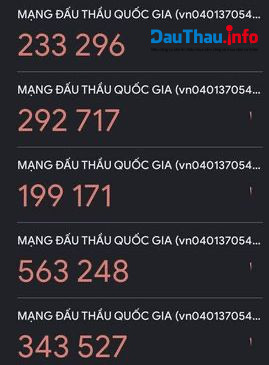
<p dir="ltr" style="text-align:justify"><u><strong>Trả lời:</strong></u> Trường hợp này xảy ra do bạn thực hiện quét quá nhiều lần. Để khắc phục tình trạng này để tránh gây nhầm lẫn giữa các mã, bạn thực hiện chọn Xóa tài khoản trên App và quét lại mã QR. Sau đó tiến hành đăng nhập lại.</p>
<div class="image-center">
<figure class="image"><img alt="Trường hợp App Google Authenticator hiển thị cùng lúc một loạt mã OTP" height="365" src="https://dauthau.asia/uploads/news/2023_04/nhieu-ma-giong-nhau.jpeg" width="269" />
<figcaption><em>Trường hợp App Google Authenticator hiển thị cùng lúc một loạt mã OTP</em></figcaption>
</figure>
</div>
<h3 dir="ltr" style="text-align:justify"><strong>4. Mã trên điện thoại chuyển từ xanh sang đỏ là có vấn đề gì?&nbsp;</strong></h3>
<p dir="ltr" style="text-align:justify"><u><strong>Trả lời:</strong></u> Trên ứng dụng sẽ hiển thị dòng mã OTP đếm ngược từ màu xanh chuyển sang đỏ, hết 30s thì mã cũ biến mất và hết hiệu lực, màn hình hiện mã khác, bạn cần nhập đoạn mã còn hiển thị trên màn hình.&nbsp;</p>
<div class="image-center">
<figure class="image"><img alt="Trường hợp App Google Authenticator hiển thị cùng lúc một loạt mã OTP" height="800" src="https://dauthau.asia/uploads/news/2023_04/ma-authen-chuyen-mau.jpg" width="740" />
<figcaption><em>Mã trên điện thoại chuyển xanh sang đỏ</em></figcaption>
</figure>
</div>
<h3 dir="ltr" style="text-align:justify"><strong>5. Khi đã dùng Authenticator trên điện thoại rồi thì nhập mã QR bằng cách nào?</strong></h3>
<p dir="ltr" style="text-align:justify"><u><strong>Trả lời:</strong></u> Bạn bấm vào dấu cộng ở góc phải trong ứng dụng, rồi chọn quét một mã QR mới là được.&nbsp;</p>
<div class="image-center">
<figure class="image"><img alt="Quét mã QR trên ứng dụng Google Authenticator trên điện thoại" height="430" src="https://dauthau.asia/uploads/news/2023_04/quet-ma-qr-tren-ung-dung-google-authenticator-tren-dien-thoai.png" width="349" />
<figcaption><em>Quét mã QR trên ứng dụng Google Authenticator trên điện thoại</em></figcaption>
</figure>
</div>
<h2 dir="ltr" style="text-align:justify"><strong>Hướng dẫn đăng nhập Hệ thống e-GP qua Google Authenticator trên máy tính</strong></h2>
<p dir="ltr" style="text-align:justify">Ngoài hình thức đăng nhập qua điện thoại, người dùng cũng có thể nhận mã OTP của ứng dụng Google Authenticator để đăng nhập Hệ thống eGP qua máy tính.</p>
<h3 dir="ltr" style="text-align:justify"><strong>1. Muốn lấy mã xác thực OTP qua máy tính thì làm như thế nào?</strong></h3>
<p dir="ltr" style="text-align:justify"><u><strong>Trả lời:</strong></u> Để lấy mã OTP qua máy tính thì bạn tiến hành <a href="https://chrome.google.com/webstore/detail/authenticator/bhghoamapcdpbohphigoooaddinpkbai?hl=vi">thêm ứng dụng Google Authenticator trong cửa hàng Chrome trực tuyến</a> rồi tiến hành quét mã.&nbsp;</p>
<div class="image-center">
<figure class="image"><img alt="Thêm ứng dụng Google Authenticator trong cửa hàng Chrome trực tuyến trên máy tính" height="573" src="https://dauthau.asia/uploads/news/2023_04/them-ung-dung-google-authenticator-trong-cua-hang-chrome-truc-tuyen-tren-may-tinh.png" width="850" />
<figcaption><em>Thêm ứng dụng Google Authenticator trong cửa hàng Chrome trực tuyến trên máy tính</em></figcaption>
</figure>
</div>
<h3 dir="ltr" style="text-align:justify"><strong>2. Nếu đã đăng nhập eGP qua Authenticator trên điện thoại rồi thì có đăng nhập bằng máy tính được nữa không?&nbsp;</strong></h3>
<p dir="ltr" style="text-align:justify"><u><strong>Trả lời:</strong></u> Bạn vẫn tiến hành đăng nhập trên máy tính bình thường. Chi tiết bạn có thể xem tại: <a href="https://dauthau.asia/news/dau-thau/video-huong-dan-dang-nhap-qua-ung-dung-google-authenticator-tren-he-thong-dau-thau-moi-837.html">&#91;VIDEO&#93; Hướng dẫn đăng nhập qua ứng dụng Google Authenticator trên hệ thống đấu thầu mới</a>.</p>
<div class="image-center">
<figure class="image"><img alt="chon ung dung google authenticator de xac thuc tai khoan" height="408" src="https://dauthau.asia/uploads/news/2023_04/chon-ung-dung-google-authenticator-de-xac-thuc-tai-khoan.jpeg" width="850" />
<figcaption><em>Đăng nhập qua Authenticator trên máy tính&nbsp;</em></figcaption>
</figure>
</div>
<h3 dir="ltr" style="text-align:justify"><strong>3. Đã nhập Authenticator vào Chrome trên máy tính thì Scan như thế nào?</strong></h3>
<p dir="ltr" style="text-align:justify"><u><strong>Trả lời:</strong></u> Bạn bấm vào nút Tiện ích rồi chọn Authenticator để quét trên máy tính. Tiến hành chọn Scan QR code và quét thành công thì sẽ đc 1 đoạn mã như khi dùng trên điện thoại.&nbsp;</p>
<div class="image-center">
<figure class="image"><img alt="scan qr code de xac thuc" height="310" src="https://dauthau.asia/uploads/news/2023_04/scan-qr-code-de-xac-thuc.jpeg" width="850" />
<figcaption><em>Dùng Google Authenticator để quét QR trên máy tính&nbsp;</em></figcaption>
</figure>
</div>
<h3 dir="ltr" style="text-align:justify"><strong>4. Đã từng đăng nhập trên máy tính sau đó đăng nhập lại không thấy hiện mã QR để quét, chỉ có phần điền mã, là lỗi gì?</strong></h3>
<p dir="ltr" style="text-align:justify"><u><strong>Trả lời:</strong></u> Bước quét mã bạn chỉ cần thực hiện lần đầu. Với những lần sau, bạn mở ứng dụng Google Authenticator để lấy mã OTP và không cần quét QR nữa.</p>
<div class="image-center">
<figure class="image"><img alt="Mở ứng dụng Google Authenticator trên máy tính để lấy mã OTP" height="239" src="https://dauthau.asia/uploads/news/2023_04/mo-ung-dung-google-authenticator-tren-may-tinh-de-lay-ma-otp.png" width="269" />
<figcaption><em>Mở ứng dụng Google Authenticator trên máy tính để lấy mã OTP</em></figcaption>
</figure>
</div>
<h2 dir="ltr" style="text-align:justify"><strong>Những vấn đề thường gặp khác khi đăng nhập qua Google Authenticator trên Hệ thống e-GP mới</strong></h2>
<p dir="ltr" style="text-align:justify">Ngoài các vấn đề gặp phải khi thao tác trên điện thoại và máy tính, có những trường hợp sau người dùng cũng cần lưu ý:</p>
<h3 dir="ltr" style="text-align:justify"><strong>1. Chuyển xác nhận mã qua ứng dụng Google Authenticator rồi khi đăng nhập có phải nhận mã qua Gmail rồi mới tới quét mã QR không?</strong></h3>
<p dir="ltr" style="text-align:justify"><u><strong>Trả lời:</strong></u> Nếu đã chuyển qua hình thức xác nhận bằng Google Authenticator thì bạn không cần nhận mã qua Gmail nữa. Ở lần đăng nhập tiếp theo, bạn mở ứng dụng để nhập mã từ Authenticator.&nbsp;</p>
<p dir="ltr" style="text-align:justify">Ngoài ra từ ngày 01/05/2023, Hệ thống mạng đấu thầu quốc gia e-GP sẽ chính thức ngừng sử dụng hình thức nhận mã xác thực (OTP) qua email. Vậy nên bạn cũng không thể sử dụng hình thức này nữa mà thay vào đó sử dụng hoàn toàn bằng hình thức nhận OTP qua ứng dụng Google Authenticator.&nbsp;</p>
<div class="image-center">
<figure class="image"><img alt="thông báo của Hệ thống eGP" height="97" src="https://dauthau.asia/uploads/news/2023_04/thong-bao.png" width="798" />
<figcaption><em>Hệ thống e-GP thay đổi hình thức nhận mã xác thực</em></figcaption>
</figure>
</div>
<h3 dir="ltr" style="text-align:justify"><strong>2. Làm sao để thay đổi hình thức nhận mã xác thực từ email sang ứng dụng Google Authenticator?&nbsp;</strong></h3>
<p dir="ltr" style="text-align:justify"><u><strong>Trả lời:</strong></u> Sau khi đăng nhập hệ thống eGP, bạn truy cập Trang cá nhân ⇒ chọn Thông tin tài khoản và chứng tư số ⇒ chọn Thay đổi hình thức nhận mã xác thực.</p>
<p dir="ltr" style="text-align:justify">Tại đây bạn chọn hình thức nhận mã xác thực là Ứng dụng di động và chọn Lưu để xác nhận như hình dưới đây.</p>
<div class="image-center">
<figure class="image"><img alt="Thay đổi hình thức nhận mã xác thực" height="320" src="https://dauthau.asia/uploads/news/2023_04/thay-doi-hinh-thuc-nhan-ma-xac-thuc.png" width="636" />
<figcaption><em>Thay đổi hình thức nhận mã xác thực</em></figcaption>
</figure>
</div>
<p dir="ltr" style="text-align:justify">Ngoài ra,&nbsp;để nhà thầu/ bên mời thầu lưu giữ mật khẩu khi sử dụng hình thức nhận mã xác thực qua ứng dụng Google Authenticator mà không cần lo lắng khi thiết bị dùng nhận mã bị hỏng hay bị mất nữa, bạn nên tham khảo &quot;<a href="https://dauthau.asia/news/thong-tin-ho-tro/huong-dan-cach-dong-bo-google-authenticator-len-dam-may-chia-se-cho-nhieu-thiet-bi-965.html" target="_blank">Hướng dẫn cách đồng bộ Google Authenticator lên đám mây &amp; chia sẻ cho nhiều thiết bị</a>&quot; của DauThau.info, với cách này mã của bạn sẽ tự động được sao lưu và khôi phục trên mọi thiết bị mới mà bạn thay đổi, bạn cũng không cần phải lưu lại khóa ban đầu như trước nữa.&nbsp;<br />
<br />
Trên đây là một số trường hợp mà người sử dụng có thể gặp phải khi đăng nhập <a href="https://dauthau.asia/news/tag/he-thong-mang-dau-thau-quoc-gia-egp-moi" target="_blank">Hệ thống mạng đấu thầu quốc gia e-GP mới</a> qua Google Authenticator. DauThau.info sẽ tiếp tục cập nhật các thông tin hướng dẫn để bên mời thầu/ nhà thầu dễ dàng tham gia đấu thầu trên Hệ thống eGP.&nbsp;</p>
<p dir="ltr" style="text-align:justify"><strong>Nếu bạn có bất kỳ vấn đề gì thắc mắc hãy liên hệ ngay với DauThau.info qua:</strong></p>
<ul dir="ltr">
	<li role="presentation">Kênh chat:&nbsp;<a href="https://m.me/dauthau.info" rel="noopener noreferrer nofollow" target="_blank">m.me/dauthau.info</a></li>
	<li role="presentation">Hotline:&nbsp;<a href="tel:0904.634.288">0904.634.288</a>&nbsp;hoặc&nbsp;<a href="tel:024.8888.4288">024.8888.4288</a></li>
	<li role="presentation">Email:&nbsp;<a href="mailto:contact@dauthau.asia">contact@dauthau.asia</a></li>
	<li role="presentation">Zalo OA:&nbsp;<a href="https://zalo.me/710508638087188690" rel="noopener noreferrer nofollow" target="_blank">https://zalo.me/710508638087188690</a></li>
	<li>Group Hỗ trợ nhà thầu:&nbsp;<a href="http://www.fb.com/groups/nhathaumuasamcong" rel="noopener noreferrer nofollow" target="_blank">www.fb.com/groups/nhathaumuasamcong</a></li>
</ul>
<strong>Xem thêm:</strong> <a href="https://dauthau.asia/news/thong-tin-ho-tro/huong-dan-khac-phuc-cac-van-de-thuong-gap-tren-google-authenticator-phan-2-1004.html" target="_blank">Hướng dẫn khắc phục các vấn đề thường gặp trên Google Authenticator - Phần 2</a>
        </div>
                <div id="author">
                        <p>
                <strong>Tác giả:</strong>
                <a href="https://dauthau.asia/news/author/thuy-nguyen/">Thuy Nguyen</a>
            </p>
        </div>
    </div>
    <div id="footer" class="clearfix">
        <div id="url">
            <strong>URL của bản tin này: </strong><a href="https://dauthau.asia/news/savefile/hoi-dap-dau-thau/giai-dap-thac-mac-khi-dang-nhap-qua-google-authenticator-tren-he-thong-mang-dau-thau-quoc-gia-moi-918.html" title="Giải đáp thắc mắc khi đăng nhập qua Google Authenticator trên Hệ thống mạng đấu thầu quốc gia mới - Phần 1">https://dauthau.asia/news/savefile/hoi-dap-dau-thau/giai-dap-thac-mac-khi-dang-nhap-qua-google-authenticator-tren-he-thong-mang-dau-thau-quoc-gia-moi-918.html</a>
        </div>
        <div class="clear"></div>
        <div class="copyright">
            &copy; DauThau.info - Siêu phần mềm phân tích và săn tin thầu
        </div>
        <div id="contact">
            <a href="mailto:info@dauthau.asia">info@dauthau.asia</a>
        </div>
    </div>
</div>
        <div class="pswp" tabindex="-1" role="dialog" aria-hidden="true">
            <div class="pswp__bg"></div>
            <div class="pswp__scroll-wrap">
                <div class="pswp__container">
                    <div class="pswp__item"></div>
                    <div class="pswp__item"></div>
                    <div class="pswp__item"></div>
                </div>
                <div class="pswp__ui pswp__ui--hidden">
                    <div class="pswp__top-bar">
                        <div class="pswp__counter"></div>
                        <button class="pswp__button pswp__button--close" title="Đóng (Esc)"></button>
                        <button class="pswp__button pswp__button--fs" title="Toàn màn hình"></button>
                        <button class="pswp__button pswp__button--zoom" title="Kích thước thực"></button>
                        <div class="pswp__preloader">
                            <div class="pswp__preloader__icn">
                              <div class="pswp__preloader__cut">
                                <div class="pswp__preloader__donut"></div>
                              </div>
                            </div>
                        </div>
                    </div>
                    <div class="pswp__share-modal pswp__share-modal--hidden pswp__single-tap">
                        <div class="pswp__share-tooltip"></div>
                    </div>
                    <button class="pswp__button pswp__button--arrow--left" title="Trước (phím trái)">
                    </button>
                    <button class="pswp__button pswp__button--arrow--right" title="Sau (Phím phải)">
                    </button>
                    <div class="pswp__caption">
                        <div class="pswp__caption__center"></div>
                    </div>
                </div>
            </div>
        </div>
        <div id="timeoutsess" class="chromeframe">
            Bạn đã không sử dụng site, <a onclick="timeoutsesscancel();" href="https://dauthau.asia/#">Bấm vào đây để duy trì trạng thái đăng nhập</a>. Thời gian chờ: <span id="secField"> 60 </span> giây
        </div>
        <div id="openidResult" data-sso-domain="https://iportal.vn" class="nv-alert" style="display:none"></div>
        <div id="openidBt" data-result="" data-redirect=""></div>
        <div id="fb-root"></div>
<script src="https://dauthau.asia/assets/js/jquery/jquery.min.js"></script>
<script>var nv_base_siteurl="/",nv_assets_dir="assets",nv_lang_data="vi",nv_lang_interface="vi",nv_name_variable="nv",nv_fc_variable="op",nv_lang_variable="language",nv_module_name="news",nv_func_name="savefile",nv_is_user=0, nv_my_ofs=7,nv_my_abbr="+07",nv_cookie_prefix="nv4c_asia",nv_check_pass_mstime=29938000,nv_area_admin=0,nv_safemode=0,theme_responsive=1,nv_recaptcha_ver=2,nv_recaptcha_sitekey="6Lc5g1AUAAAAAAfvGBOy9_670MiVcRKh1IXrIWOQ",nv_recaptcha_type="image",nv_turnstile_sitekey="",XSSsanitize=0,nv_jsdate_get="dd-mm-yyyy",nv_jsdate_post="dd/mm/yyyy",nv_js_am="SA",nv_js_pm="CH",nv_gfx_width="150",nv_gfx_height="40",nv_gfx_num="6",nv_cache_timestamp=1780977016;</script>
<script src="https://dauthau.asia/assets/js/language/vi.js"></script>
<script src="https://dauthau.asia/assets/js/global.js"></script>
<script src="https://dauthau.asia/assets/js/site.js"></script>
<script src="https://dauthau.asia/assets/js/moment/moment.min.js"></script>
<script src="https://dauthau.asia/themes/dauthau/js/news.js"></script>
<script src="https://dauthau.asia/assets/js/perfect-scrollbar/min.js"></script>
<script src="https://dauthau.asia/themes/dauthau/plugins/daterangepicker/daterangepicker-luna.js"></script>
<script src="https://dauthau.asia/themes/dauthau/js/photoswipe.js"></script>
<script src="https://dauthau.asia/themes/dauthau/js/photoswipe-ui-default.js"></script>
<script src="https://dauthau.asia/themes/dauthau/js/main.js"></script>
<script src="https://dauthau.asia/themes/dauthau/js/jquery.dataTables.min.js"></script>
<script src="https://dauthau.asia/assets/js/show-pass-btn/bootstrap3-show-pass.js"></script>
<script>var url_load_remote = 'https://api.dauthau.asia/mload.php?timestamp=1781088374&userhash=f50a0929177c5971ae77fa531c8424eb', domain_load_remote = 'https://api.dauthau.asia/', url_sload_remote = 'https://api.dauthau.asia/sload.php?timestamp=1781088374&userhash=f50a0929177c5971ae77fa531c8424eb';</script>
<script type="application/ld+json">
{"@context":"https://schema.org","@type":"WebSite","name":"DauThau.info - Siêu phần mềm phân tích và săn tin thầu","url":"https://dauthau.asia/","potentialAction":{"@type":"SearchAction","target":{"@type":"EntryPoint","urlTemplate":"https://dauthau.asia/seek/?q={search_term_string}"},"query-input":"required name=search_term_string"}}
</script>
<script type="application/ld+json">
            {"@context":"https://schema.org","@graph":[{"@context":"https://schema.org","@type":"SiteNavigationElement","id":"site-navigation","name":"Giới thiệu","url":"https://dauthau.asia/about/gioi-thieu-ve-dauthau-info.html"},{"@context":"https://schema.org","@type":"SiteNavigationElement","id":"site-navigation","name":"Bảng giá","url":"https://dauthau.asia/page/bang-gia.html"},{"@context":"https://schema.org","@type":"SiteNavigationElement","id":"site-navigation","name":"Tin tức","url":"https://dauthau.asia/news/"},{"@context":"https://schema.org","@type":"SiteNavigationElement","id":"site-navigation","name":"Đấu thầu","url":"https://dauthau.asia/detail/"},{"@context":"https://schema.org","@type":"SiteNavigationElement","id":"site-navigation","name":"Hướng dẫn","url":"https://dauthau.asia/page/huong-dan-su-dung.html"},{"@context":"https://schema.org","@type":"SiteNavigationElement","id":"site-navigation","name":"Liên hệ","url":"https://dauthau.asia/contact/"}]}
        </script>
<script src="https://dauthau.asia/themes/dauthau/js/bootstrap.min.js"></script>
</body>
</html>